No. 02 · Running webinars · November 2026 · 12 min read
Guide 02 · Running webinars

How to run a webinar

Before, during and after, and why one is never enough

12 min read · Checklist and FAQ inside

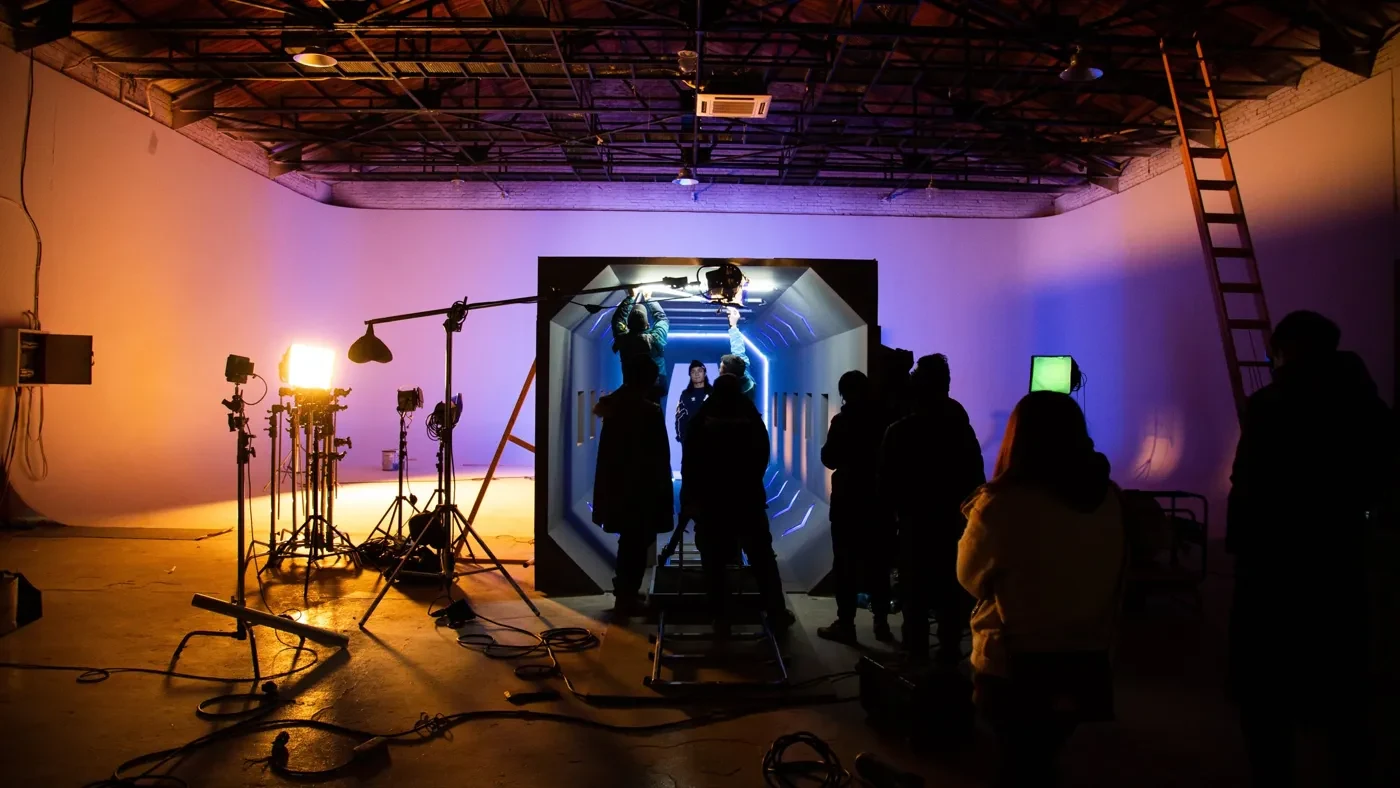
A crew setting lights in a production studio before a live session
The live hour is the visible part. Most of the work happens around it.
Photo by Hao Rui on Unsplash

Most webinars are won or lost before anyone presses "go live". By the time your expert says hello, the audience has already been chosen, invited, reminded, and either kept or lost. Most of the value arrives after the session ends, and the biggest prize comes from running the next one.

Think about every expert event in three phases: before, during and after. Most teams pour their energy into the live hour. The best teams give the weeks either side the same care, and they start planning the next session before the first one has even happened. This is the playbook we use with the pharma, agency and consumer health teams who run sessions on Adelo, with the evidence behind each step.

One note on numbers. The benchmarks below come from webinar platforms' own data, mostly business audiences. Treat them as a yardstick rather than a target. Your best benchmark will always be your own last event.

Fig. 1The timeline

Seven checkpoints, from six weeks out to the next session

BEFOREDURINGAFTERTHE PROGRAM4–6 weeks outWrite theone-sentence goalChoose format andexpertsStart compliancereview2–3 weeks outOpen registrationStart the emailsequenceWrite the run ofshowEvent weekRehearse on thereal platformTest the joinlink on a phoneSend remindersLIVEOn the dayOpen early, starton timeFirst poll infive minutesWithin 24 hoursRecording toeveryoneClip the bestmomentsPublish on demandWithin 2 weeksAnalyze againstyour goalDecide whatchangesNextFile it in thelibraryBook the nextsession

Adelo Guides · based on the checklist in this article

1

Before the webinar: design the whole event

Write the one sentence everything else hangs on

Before you book a speaker, finish this sentence: By the end of this session, [a specific audience] will be able to [a specific thing]. "Community pharmacists will be able to explain the new evidence on X to customers" is a brief. "Raise awareness of X" is not. That sentence decides your speaker, your format, your length and your promotion.

Choose the webinar format that fits the goal

GoalFormatWhy it works
EducateOne expert talk with plenty of time for questionsDepth and a clear line of argument
Explore a debateA moderated panel of two or three expertsReal disagreement keeps people watching
Tell a storyAn interview, where a host draws the expertise outFeels like a conversation
Gather insightA small, highly interactive session or advisory boardMore voices, richer data

How long should a webinar be?

You'll often hear that people can only concentrate for 10 to 15 minutes. Neil Bradbury traced that claim back and found the primary evidence doesn't support it.1 Industry benchmarks for 2026 put average engagement at 49 minutes in 2025.2 So a 45 to 60 minute session is fine, if it's well run. Build in a change of pace every so often, because variety is how good teachers hold a room.

What is the best day and time to host a webinar?

There is no magic day. Mid-week tends to work, but consistency matters more than the perfect slot: a regular time teaches your audience when to expect you. For clinical audiences, clinic hours and on-call patterns matter more than any benchmark, so ask five people in your audience when they could realistically join.

Prepare your experts like a broadcast

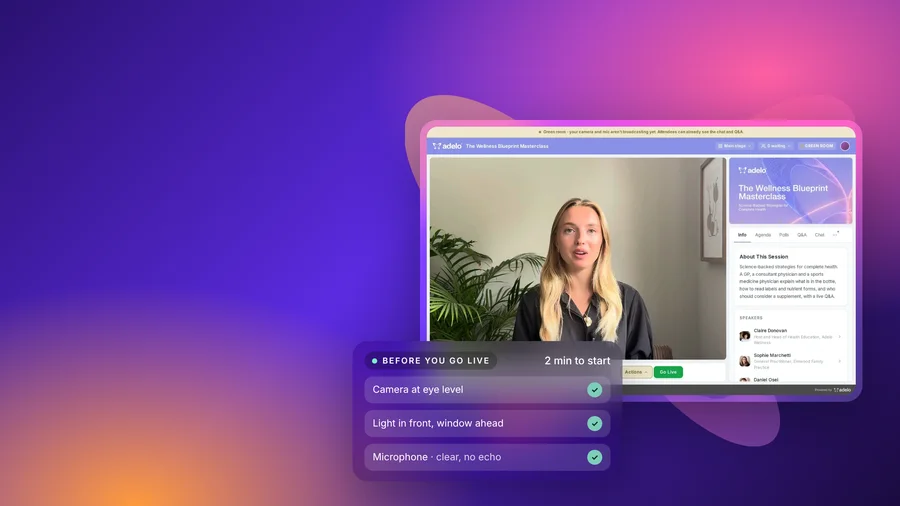
TV studios never put a guest on air without a producer, a run of show and a rehearsal. Treat your experts the same way. Brief them early, rehearse on the real platform a few days before, and send them our guide to looking good on a webinar.

Three roles, so nobody runs the room alone

On screen

Expert

Delivers the substance and answers questions.

On screen

Host or moderator

Opens and runs the conversation, groups and reads questions, and bridges if something breaks.

Behind the scenes

Producer

Runs audio, video, polls and captions, watches the lobby and keeps a private line to the speakers.

Audience questions go to the host.The producer talks to the speakers on a private back channel.

The production model Adelo uses for supported events

How many emails should you send?

Most people decide late: a 2026 benchmark report based on more than 7 million registrations found around half sign up in the final week.3 Promotion that stops two weeks out misses half the audience. Sending more emails won't fix that by itself; giving each message a single job will. This is the sequence to start from, then adjust for your audience. For clinicians, our guide to getting healthcare professionals to attend goes further.

WhenMessageIts one job
About 3 weeks outInvitation 1The promise: what they'll be able to do afterwards
About 10 days outInvitation 2, to non-openersA new angle: the speaker, or a question they'll answer
2 days outInvitation 3Last call, and "you'll get the recording"
On sign-upConfirmationA calendar invite with the join link inside it
7 days, 1 day, 1 hourThree remindersThe last one is the link and nothing else
Within 24 hoursFollow-up 1Recording, slides and answers, to everyone who registered
Within a weekFollow-up 2The best clip and the date of the next session

Make joining a one-click job

This is where webinars lose the most people without anyone noticing, and it is the complaint we hear most from clinicians. A link that asks for a download, a password, a second registration or a browser plug-in loses people at exactly the moment they've made time for you. The web already knows how unforgiving this is: Google found that 53% of mobile visits are abandoned when a page takes longer than three seconds to load.9 A webinar lobby is no different.

  • Browser only, no downloads. Hospital laptops and NHS or corporate networks often block installs and plug-ins.
  • One personal link. In the calendar invite and the reminders, so nobody hunts for a password at 5:59.
  • Test it on a phone, on 4G, on a locked-down work laptop. Many clinicians join from exactly those.
  • Put a human on the door. A producer watching the lobby and a simple help line rescue people who would otherwise give up.
  • Let people rejoin in one click after a dropped connection, without registering again.

Get compliance, consent and accessibility right from day one

Tell registrants who is collecting their details and why, as the ICO's right to be informed requires under UK GDPR.4 In pharma, Clause 10 of the 2024 ABPI Code requires companies to examine planned events for compliance, so build review into week one.5 In the US, the PhRMA Code plays a similar role. And caption the session: WCAG success criterion 1.2.4 asks for captions on live audio.6

Consumer health has rules too, even without a medical affairs team. In the UK, food and supplement brands can only make health claims that are authorized on the GB register, and the ASA judges an ad by what consumers are likely to understand, including claims that are only implied.10 In the US, the FTC's 2022 Health Products Compliance Guidance says health claims need competent and reliable scientific evidence, generally randomized controlled trials, and that expert endorsers and influencers can be liable alongside the brand.11 An expert on camera saying "this helps with anxiety" is a claim. Brief them on what they can and can't say, and read the questions before they go on screen. Our compliance guide covers the detail.

2

During the webinar: run it like live television

  • Open the room early with a holding slide, so early arrivals know they're in the right place.
  • Start on time. The people who turned up on time are the ones you most want to keep.
  • Lead with the promise: say your one-sentence goal out loud in the first minute.
  • Do housekeeping in 30 seconds, then get straight into substance.
  • Launch a quick poll early. It gets people clicking and tells your expert who's in the room.

Use polls to help people learn

Polls do more than keep people awake. Roediger and Karpicke showed that being asked to recall information beats rereading it when people are tested a week later.7 A well-placed knowledge check helps your audience remember what your expert said.

Ask, show the result, then explain it
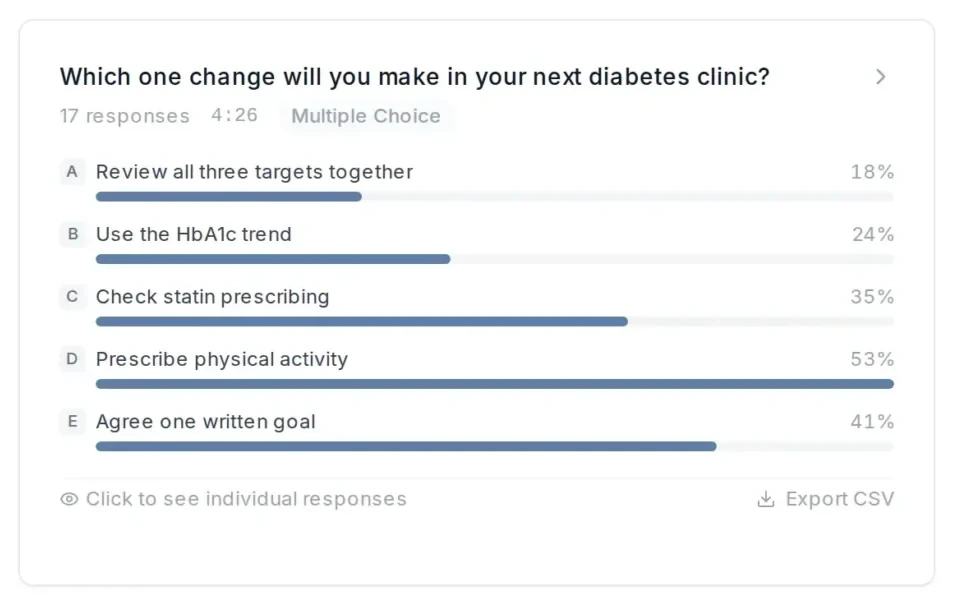
Adelo poll results: which one change will you make in your next diabetes clinic, 17 responses123
  1. 1The question stays on screen while people vote: 17 responses in 4 minutes 26 seconds.
  2. 2Only 18% chose to review all three targets together, the habit the session was built around. That gap is what the expert talks to next.
  3. 3The most popular answer, 53%, gives the expert an easy place to start.

Real Adelo screen · live poll results, as the host sees them

Make Q&A the best part of the hour

  • Seed it. Have one or two strong questions ready, gathered at registration.
  • Take questions throughout. Waiting until the end loses the people who had to leave early.
  • Group and edit. The moderator combines similar questions and reads them out clearly.
  • Agree the rules before you go live. In pharma, that includes off-label questions and possible adverse events. In consumer health, it includes anything that sounds like a diagnosis or a cure.

Give the producer a separate seat

The moderator should be the one running the conversation. A producer watches audio and video, spotlights the right speaker, launches polls on cue, watches the lobby for people who can't get in and keeps a private back channel to the experts. When something goes wrong, and it will, the host bridges with a question while the producer fixes it.

The moderator looks after the conversation so the producer can look after everything else.
Adelo Guides · 02
3

After the webinar: where most of the value is made

Interest fades quickly after a session. A well-known 2011 Harvard Business Review study found firms that responded to an enquiry within an hour were nearly seven times as likely to have a meaningful conversation as those that waited even an hour longer.8 Their research was about sales leads, but the principle holds: momentum is perishable.

24h

to send the recording to every registrant

10

messages, each with one job, from invite to follow-up

7×

more likely to connect if you follow up within the hour

49min

average engagement per webinar

  • Send the recording and resources the same day, to everyone who registered, including people who missed it.
  • Answer the questions you didn't get to. A short written follow-up from the expert is often the most valued thing you send.
  • Treat on-demand as a second premiere. Publish within 24 hours with corrected captions, chapters and a short summary.
  • Thank your experts within a day, and share the attendance, questions and poll results with them.

Clip the moments that landed, within a day

Your engagement data tells you exactly which minutes worked: where the audience was most attentive, where the questions spiked, where the poll results surprised everyone. Those two or three moments are your best content of the month. Cut them into short clips of 30 to 90 seconds while the session is still fresh, caption them, and send them to the people who missed it and the people who'll share it. In pharma and other regulated settings, clips go through the same review as the session, which is one more reason to have the recording, transcript and approvals in one place.

4

Why one webinar is never enough

Even a perfect single webinar has a problem: most of your audience will have forgotten most of it within days. Hermann Ebbinghaus first measured this in the 1880s. In 2015, Jaap Murre and Joeri Dros repeated his experiment and reproduced the same forgetting curve: memory falls steeply at first, then levels off.12

The remedy is just as well established. A 2006 review in Psychological Bulletin by Nicholas Cepeda and colleagues pulled together 317 experiments on spacing and found that information met more than once, with gaps in between, is remembered better than information met all at once. The longer you want people to remember, the longer the best gap between exposures.13 A series of sessions spaced over weeks does exactly that.

Fig. 4Programs

Spaced sessions keep more of the message weeks later

ILLUSTRATIVE · HOW MUCH OF THE KEY MESSAGE IS RETAINED OVER TEN WEEKS0%50%100%Week 0Week 2Week 4Week 6Week 8Week 10SessionSessionSessionOne-off webinarA program: three sessions, spacedClip, email or on-demand reminderCurves are illustrative, drawn to the shape of the forgetting curve (Ebbinghaus; Murre and Dros, 2015) and the spacing effect (Cepeda et al., 2006). Not measured data.

Illustrative · after Ebbinghaus, Murre and Dros (2015) and Cepeda et al. (2006)

So how many times does a message have to land?

You'll often hear a confident number: seven touches, or three. The three comes from advertising researcher Herbert Krugman, who argued in 1972 that three exposures may be enough for an ad to do its work.14 The seven has no solid source that we can find. The learning research doesn't support a magic number. What matters is that the message comes back, spaced out, in forms that make people recall it rather than just see it again. A session, a clip, a knowledge check in the follow-up email and a second session a few weeks later does more than one long webinar ever can.

Why a program needs a library

A program creates a lot of material: recordings, transcripts, polls, questions, clips, approvals, consent records. Spread across a webinar tool, a video host, a shared drive and someone's inbox, it is hard to find and risky to keep. In one place, it becomes useful. The questions from session one write the agenda for session two. Last quarter's best clip onboards next quarter's sales team. The approved answer to the hardest question can be reused instead of reviewed again. Every expert video you make, in person or online, should land in a library that you can search, reuse and prove what was said and who agreed to what.

Spaced sessions beat a single session for what people remember weeks later.
Adelo Guides · 02

Within a week, go back to the goal you wrote at the very start. How to do that properly is set out in our guide to analyzing webinar data.

The webinar checklist

Webinar checklistAdelo Guides · 02 · Tick as you go

Before

During

After and next

Frequently asked questions

How do you run a successful webinar?

Write a one-sentence goal, choose the right format, send a planned email sequence, make joining a one-click job, rehearse on the real platform, run the session with separate host and producer roles, send the recording and the best clips within 24 hours, and plan the next session.

How many emails should you send for a webinar?

A sensible default is three invitations (about three weeks, ten days and two days out), a confirmation with a calendar invite, three reminders (a week, a day and an hour before), and two follow-ups after: the recording within 24 hours, then clips and answers within a week.

How long should a webinar be?

Around 45 to 60 minutes works if it is well run. One large 2026 benchmark study put average engagement at 49 minutes. Change the pace every so often with a poll, a new voice or a question.

Why run a webinar series instead of a one-off?

Because people forget fast. The forgetting curve drops steeply in the first day, and decades of research on the spacing effect show that spaced repetition beats a single exposure. A program of spaced sessions, with clips and reminders in between, keeps the message alive.

What is the best day to host a webinar?

There is no magic day. Mid-week tends to work, but a consistent slot matters more, and for clinicians the time of day matters most: evenings beat clinic hours.

What should you do after a webinar?

Send the recording, resources and answers to unanswered questions to everyone who registered within a day, clip the most engaged moments, publish an on-demand version with corrected captions, file everything in one library and book the next session.

What should a webinar platform for healthcare include?

Browser-only joining with no download, a branded registration page with a one-click link, moderation of questions before they are shown, consent recorded before entry, live captions, engagement data lined up with the transcript, clips and on-demand publishing, and a library that keeps every session, transcript, question and consent record together.

Adelo Guides are written by the Adelo team, the professional video event platform for health. They draw on the sessions pharma, agency and consumer health teams run on Adelo every week, and on the research cited in each guide.

Sources

  1. Bradbury (2016). Attention span during lectures: 8 seconds, 10 minutes, or more? Advances in Physiology Education.
  2. ON24 (2026). Key takeaways from the webinar benchmarks report.
  3. Livestorm (2026). 2026 Webinar Benchmark Report.
  4. Information Commissioner's Office. The right to be informed.
  5. PMCPA. 2024 ABPI Code, Clause 10.
  6. W3C. Understanding success criterion 1.2.4: Captions (live).
  7. Roediger and Karpicke (2006). Test-enhanced learning. Psychological Science.
  8. Oldroyd, McElheran and Elkington (2011). The short life of online sales leads. Harvard Business Review.
  9. Google, The Need for Mobile Speed (2016), reported by Marketing Dive.
  10. Advertising Standards Authority / CAP. Food: health claims.
  11. US Federal Trade Commission (2022). Health Products Compliance Guidance, summarized by Covington.
  12. Murre and Dros (2015). Replication and analysis of Ebbinghaus' forgetting curve. PLOS ONE.
  13. Cepeda, Pashler, Vul, Wixted and Rohrer (2006). Distributed practice in verbal recall tasks: a review and quantitative synthesis. Psychological Bulletin.
  14. Krugman (1972). Why three exposures may be enough. Journal of Advertising Research. Reprinted in Consumer Behavior and Advertising Involvement.
Adelo Guides

Read the other guides

← All articles
FREE FOR 14 DAYS

Start your 14-day free trial

Run your next webinar on Adelo. Quick to set up, with no long contracts and no credit card required.